Your employer just sent you a PDF called Form 16. You need it to file your ITR. But what is it actually, and what do all those numbers mean? Here's every part explained simply.
You open it and see two sections crammed onto one document — Part A with tables of TAN numbers and quarterly figures, and Part B with a long list of salary components, deductions, and a tax computation that ends somewhere near a number you don't recognize. None of it is explained on the document itself.
This article walks through Form 16 section by section — what each part means, which numbers actually matter, and how to use it when you sit down to file your ITR. If you're checking whether your take-home number lines up with what's on paper, the BharatDash salary calculator is useful for that side of things.
What is Form 16, actually?
Form 16 is two things stapled into one document. First, it's a TDS certificate — official proof that your employer deducted tax from your salary through the year and deposited that money with the government on your behalf. Every "TDS" line you saw on your payslip has its paper trail here. Second, it's your annual salary statement — the official record of what you earned and what was deducted, for the full financial year.
Employers are legally required to issue Form 16 once a year, usually by June 15 after the financial year ends — so Form 16 for FY 2025-26 should land in your inbox by June 15, 2026. And if you switched jobs during the year, you don't get one combined Form 16 — you get a separate one from each employer you worked for.
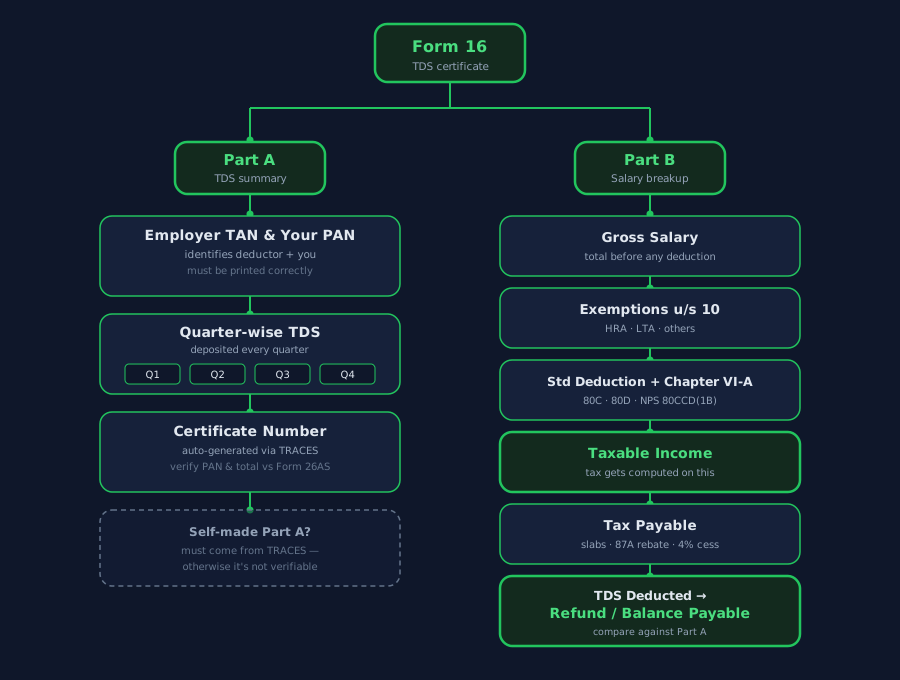
Form 16 splits into two parts: Part A confirms the TDS your employer deposited, Part B shows the full salary-to-tax calculation.
Form 16 Part A — the TDS summary
Part A confirms one thing: that TDS was actually deducted and deposited, and it's traceable in the government's system.
Employer's TAN and PAN, and your PAN. TAN (Tax Deduction and Collection Account Number) identifies your employer as the entity that deducted tax. PAN identifies you. Both appear at the top of Part A — check that your PAN is spelled and numbered correctly, because a wrong PAN means the TDS deposited may not get credited to your account at all.
Quarter-wise TDS deposited. Your employer doesn't deduct and deposit tax once a year — they do it every quarter (Q1: Apr–Jun, Q2: Jul–Sep, Q3: Oct–Dec, Q4: Jan–Mar). Part A shows how much was deducted and deposited in each quarter, which should add up to the total TDS for the year.
How to verify it's genuine. A real Part A is generated from TRACES — the Income Tax Department's TDS Reconciliation Analysis and Correction Enabling System — and carries a unique certificate number you can verify online. If your employer hands you a Part A that looks like it was typed up in Excel rather than downloaded from TRACES, that's a red flag: it means the TDS may not be properly deposited or traceable in the government's records, even if the number looks right on paper.
What to actually check: your PAN is correct, your employer's TAN is correct, and the total TDS in Part A matches what shows up in your Form 26AS (more on that shortly).
Form 16 Part B — the salary breakup, explained line by line
Part B is where the real detail is — it takes your salary and walks it all the way down to the exact tax figure, in order. Together, Form 16 Part A Part B give you everything you need for your return: the TDS proof from Part A, and the salary math from Part B. Here's every line, in the order it appears:
- Gross salary — your total salary before any exemption or deduction is applied. This should match the CTC-linked numbers you can check with the salary calculator.
- Allowances exempt under Section 10 — this is where HRA exemption, Leave Travel Allowance (LTA), and children's education allowance get subtracted out. HRA exemption in particular can be a large number if you live in a rented home — use the HRA calculator to check your employer computed it correctly.
- Net salary after exemptions — gross salary minus the Section 10 exemptions above.
- Standard deduction — a flat ₹75,000 under the new regime or ₹50,000 under the old regime. This is automatic — you don't claim it or submit any proof, it's simply subtracted.
- Deductions under Chapter VI-A — your investment and expense-based deductions: Section 80C (PF, PPF, ELSS, life insurance premiums, up to ₹1,50,000), Section 80D (health insurance premiums), Section 80CCD(1B) (additional NPS contribution, up to ₹50,000), and any others you declared to your employer.
- Total income after deductions — this is your taxable income, the number tax is actually calculated on.
- Tax on total income — computed using the applicable slab rates for the financial year.
- Rebate under Section 87A, if applicable — this zeroes out tax for taxable income up to a threshold (₹12,00,000 under the new regime for FY 2025-26 onward). If your taxable income qualifies, this line brings your tax to nil.
- Health and education cess — 4% added on top of the tax after rebate.
- Total tax payable — the final tax liability for the year.
- TDS already deducted — how much of that total tax your employer already deducted and deposited through the year (this should match Part A).
- Balance tax payable or refund due — the difference between total tax payable and TDS deducted. If TDS deducted is more than tax payable, you get a refund; if less, you owe the balance.
Form 16 vs Form 26AS vs AIS — what's the difference?
You'll come across three documents while filing: Form 16, Form 26AS, and AIS. They overlap but aren't the same thing.
| Document | Issued by | What it covers |
|---|---|---|
| Form 16 | Your employer | TDS on salary only, from that one employer |
| Form 26AS | Government (TRACES) | All TDS deducted across all sources — salary, bank FD interest, rent, etc. |
| AIS (Annual Information Statement) | Government (Income Tax Dept) | Broadest view — all financial transactions the government has on record, not just TDS |
The rule of thumb: the salary TDS figure in your Form 16 should match the salary TDS entry in your Form 26AS. If the numbers don't match, don't ignore it — flag it with your employer before you file, because a mismatch usually means either a deposit delay or an error, and it directly affects whether you get the refund you're expecting.
Common Form 16 mistakes and red flags to check
- PAN mismatch in Form 16. If your PAN is wrong or misspelled, get a correction from your employer immediately — a wrong PAN means the TDS credit may not reflect against your name at all.
- TDS in Form 16 doesn't match Form 26AS. Don't ignore this. It usually means your employer hasn't deposited, or hasn't yet reported, the full TDS amount, and it directly affects your refund calculation.
- You got Part B but no Part A. Part A has to come from TRACES — it can't be self-generated. If your employer only sends you a salary breakup with no TRACES-issued Part A, ask for it separately.
- Form 16 shows the wrong tax regime. Employers default to the new regime unless you specifically opt for the old one. If your employer used the wrong regime for TDS purposes, it's not final — you can still choose the regime that benefits you more when you actually file your ITR.
- Multiple Form 16s from job switches. Add the gross salary from each employer together for your total income, but claim deductions like 80C or the standard deduction only once across the year — not once per employer.
How to use Form 16 for ITR filing
Most of the pre-filled data in the ITR portal today pulls from Form 26AS and AIS automatically — you're not manually retyping everything from Form 16 anymore. But Form 16 is still what you use to check that pre-filled data is right.
- Form 16 Part B gives you the exact deduction figures (80C, 80D, HRA exemption, standard deduction) to verify against, or add if something's missing from the pre-fill.
- The gross salary figure from Form 16 goes into Schedule S (salary income) of your ITR.
- Don't just accept the pre-filled numbers. Open your Form 16 side by side with the ITR form and check every figure — gross salary, exemptions, deductions, TDS — against what's shown.
Form 16 ITR filing checklist
Not sure which tax regime to file under? The tax regime calculator compares old vs new side by side using your actual numbers, so you're not guessing. And if you want to double-check your in-hand figures match what your employer reported, the salary calculator walks through the same CTC-to-take-home math Form 16 is built on.
Quick FAQ
Q: Is Form 16 mandatory for ITR filing? A: Not mandatory, but practically essential for salaried employees since it has all the numbers you need.
Q: What if my employer hasn't given me Form 16? A: Employers are legally required to issue Form 16 by June 15. If they haven't, follow up in writing. You can still file using Form 26AS and salary slips, but it's harder.
Q: My Form 16 shows zero tax deducted — is that normal? A: Yes, if your income was below the taxable threshold or fully covered by exemptions and deductions, your employer may not have deducted any TDS. Still file your ITR.
Q: Can I use Form 16 from a previous employer? A: Yes — if you switched jobs mid-year, collect Form 16 from both employers and combine the income figures.
Numbers and thresholds in this article reflect FY 2025-26 / FY 2026-27 rules, including the ₹75,000 standard deduction and ₹12,00,000 rebate threshold under the new regime. Rules can change with each Budget — verify current figures before filing. This is informational, not tax advice — consult a CA for your specific filing.