There's a new AI tool announced every week, and most of them aren't worth your time. This isn't a list of everything available — it's a shorter list of what's actually earned a place in a real workflow, organised by who you are and what you're trying to get done.
I built the entire BharatDash platform you're reading this on using one of the tools below, so this isn't theoretical. Where I've used something myself, I'll say so.
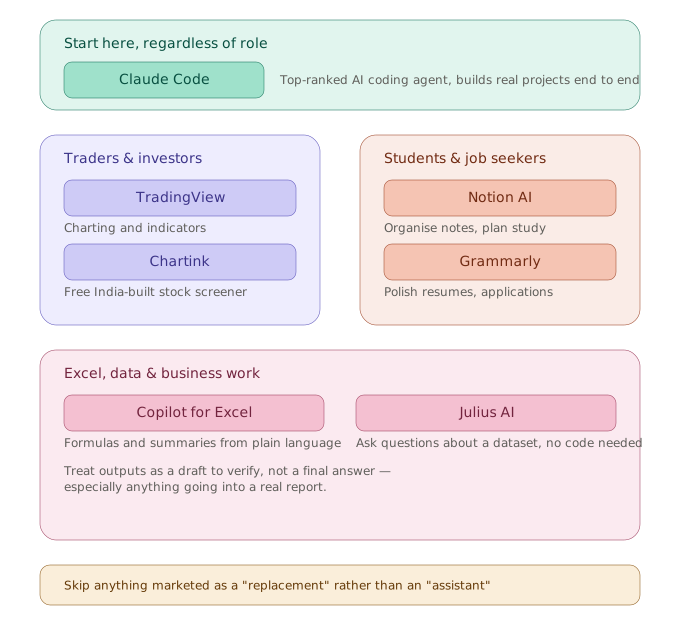
A quick map before the details: pick your category below, or read the one tool everyone should start with first.
The one I'd start with, regardless of what you do
Claude Code — Anthropic's terminal-based coding agent — is currently the strongest AI coding tool available by independent benchmark. It scores highest among AI coding agents on SWE-bench Verified, the standard test for real-world coding ability, and it's built specifically to work across large, multi-file projects rather than just autocompleting single lines.
I used Claude Code to build BharatDash from scratch — the live data widgets, the brokerage simulator, this very page you're reading. The honest reason it works well for a non-full-time developer: you describe what you want in plain language, and it reads your actual project files, writes the code, and runs it — rather than just handing you a code snippet you have to figure out how to wire in yourself.
Who it's actually for: anyone building a real project — a website, an automation script, a data pipeline — not just someone wanting code-completion in an existing job. If you're a trader who wants to build your own tools (a custom screener, a P&L tracker, a scraper for your own research), this is the most direct path from idea to working software without years of traditional coding study first.
For traders and investors
TradingView isn't new, but it's still the right starting point for any technical analysis work — charting, indicators (including custom ones like a 44-period SMA across multiple timeframes), and a genuinely useful free tier. If you're following any strategy that depends on reading charts precisely, this is non-negotiable infrastructure before you add anything AI-flavoured on top.
Chartink is a free Indian-built stock screener that lets you filter NSE/BSE stocks by technical conditions — price crossing above a moving average, volume spikes, custom combinations. For Indian retail traders specifically, this fills a gap that global tools don't, since most international screeners aren't built around Indian market structure and timing.
Where AI genuinely helps here, and where it doesn't: AI chat tools can help you understand why a strategy works, summarise news affecting a stock, or help you write the logic for a screener — but no AI tool should be making your actual buy/sell decisions for you. Be skeptical of any tool that promises to "predict" stock movement. The honest use case for AI in trading right now is research and tooling, not signal generation.
For students and job seekers
Notion AI is worth learning less for the "AI" part and more because Notion itself has become the default place a huge number of students and early-career professionals organise their work, and the AI layer (summarising notes, drafting study plans, restructuring messy content) is now mature enough to save real time rather than feeling like a gimmick.
Grammarly has quietly become more than a grammar checker — its AI rewriting suggestions are genuinely useful for non-native English speakers polishing a resume, cover letter, or college application essay, which matters directly if you're job hunting or applying anywhere that reviews written English closely.
ChatGPT is the one most people have already tried, and for good reason — it's the most widely used AI chat assistant by a large margin, and it's genuinely strong at the things students and job seekers actually need: explaining a concept at the right depth, drafting a structured study plan, or acting as a sparring partner to rehearse interview answers out loud.
Claude (the consumer chat version, not Claude Code above) is the other serious option in the same category — strong at longer, more structured reasoning and at holding a long study or prep conversation without losing the thread.
Here's the honest point about choosing between them:
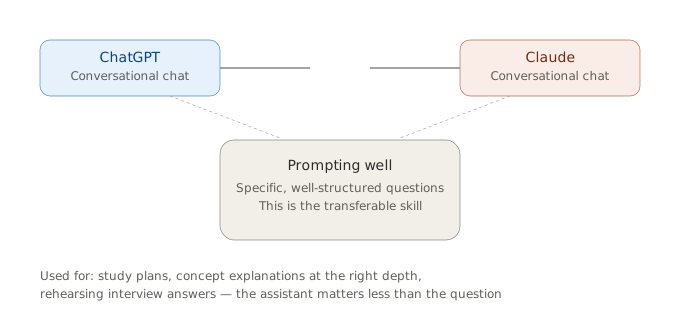
The tool matters less than the skill of using it well. Being able to ask for a structured study plan, get a concept explained at the right depth, or rehearse interview answers through conversation is the actual transferable skill — and it's increasingly assumed knowledge in interviews themselves.
For Excel, data, and business work
Microsoft Copilot for Excel is worth learning if your day-to-day already lives in spreadsheets — it can write formulas from a plain-language description, summarise a dataset, or help debug a broken pivot table. The honest caveat: it requires a Microsoft 365 subscription tier that includes Copilot, so check what you actually have access to before assuming it's free.
Julius AI lets you upload a dataset and ask questions about it in plain English, getting back charts and analysis without writing any code. For ops and business professionals who understand their data but don't write Python or SQL, this closes a real gap — though it's worth treating its output as a draft to verify, not a final answer, especially for anything going into a real report.
If Excel is where most of your day actually happens, the deeper breakdown — The Best AI Tools for Excel and Spreadsheet Work — covers Copilot, Julius AI, and Power BI in more depth, including pricing.
For engineers and designers specifically, see: AI Tools for Engineers →
Keep seeing "AI agent" everywhere and not sure if it's just a chatbot with a new name? See: AI Chatbots vs AI Agents — What's the Actual Difference? →
What's not worth your time right now
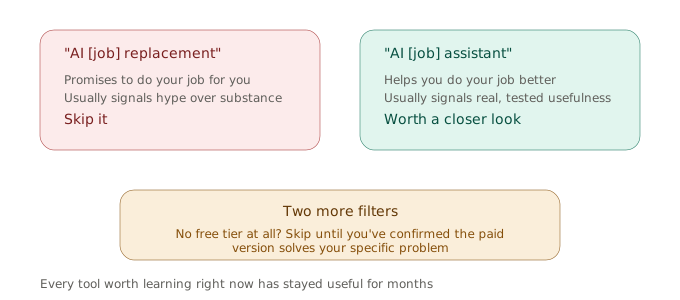
A quick filter that works surprisingly well: check how the tool describes itself before you check what it actually does.
Skip anything marketed primarily as "AI [your job] replacement" rather than "AI [your job] assistant" — the framing usually signals hype over substance. Skip tools with no free tier at all before you've confirmed the paid version actually solves your specific problem; nearly everything genuinely useful listed above has a usable free starting point. And skip chasing every new launch — the tools above have stayed useful for months, which says more than a flashy demo video ever will.
The honest summary
If you do only one thing from this list: learn to actually use an AI chat assistant well — asking specific, well-structured questions rather than vague ones — because that single skill transfers across every tool on this page, including the ones launched after this article was written.
This page reflects tools I've personally used or researched as of June 2026. AI tools change quickly — pricing, features, and free tiers mentioned here may shift over time. This is not sponsored content; any affiliate links are clearly marked and don't influence which tools are included or how they're described.